Making enterprise AI understandable, reviewable and trustworthy.
Organizations process thousands of contracts, invoices and reports every day. Machine learning can extract the structured information in seconds, but business users still need confidence before they act on it. The challenge wasn’t building a smarter model. It was designing a workflow that helped people verify AI-generated information quickly, understand where it came from, and confidently correct it when necessary.
…the total amount payable is €14,230 excluding VAT.
A platform that reads business documents so people don’t have to.
The model comes pre-trained and keeps learning from every correction. Instead of manually reading every page, users receive predicted values, and before those values flow into downstream business systems, a person reviews and approves them.
Users didn’t distrust the AI because it made mistakes.
They distrusted it because they couldn’t quickly verify whether a prediction was correct. Even high-confidence predictions were manually checked against the original document.
Read the extracted value.
Search through the document.
Find the matching sentence.
Confirm the prediction.
Return to the extraction list.
Repeat.
For a document with dozens of fields, that context-switching became the slowest part of the workflow. The problem wasn’t accuracy. It was verification.
Reduce the effort required to answer one simple question. Every design decision that followed supported this objective, and nothing else.
“Why did the AI make this prediction?”
Keep every prediction connected to its source.
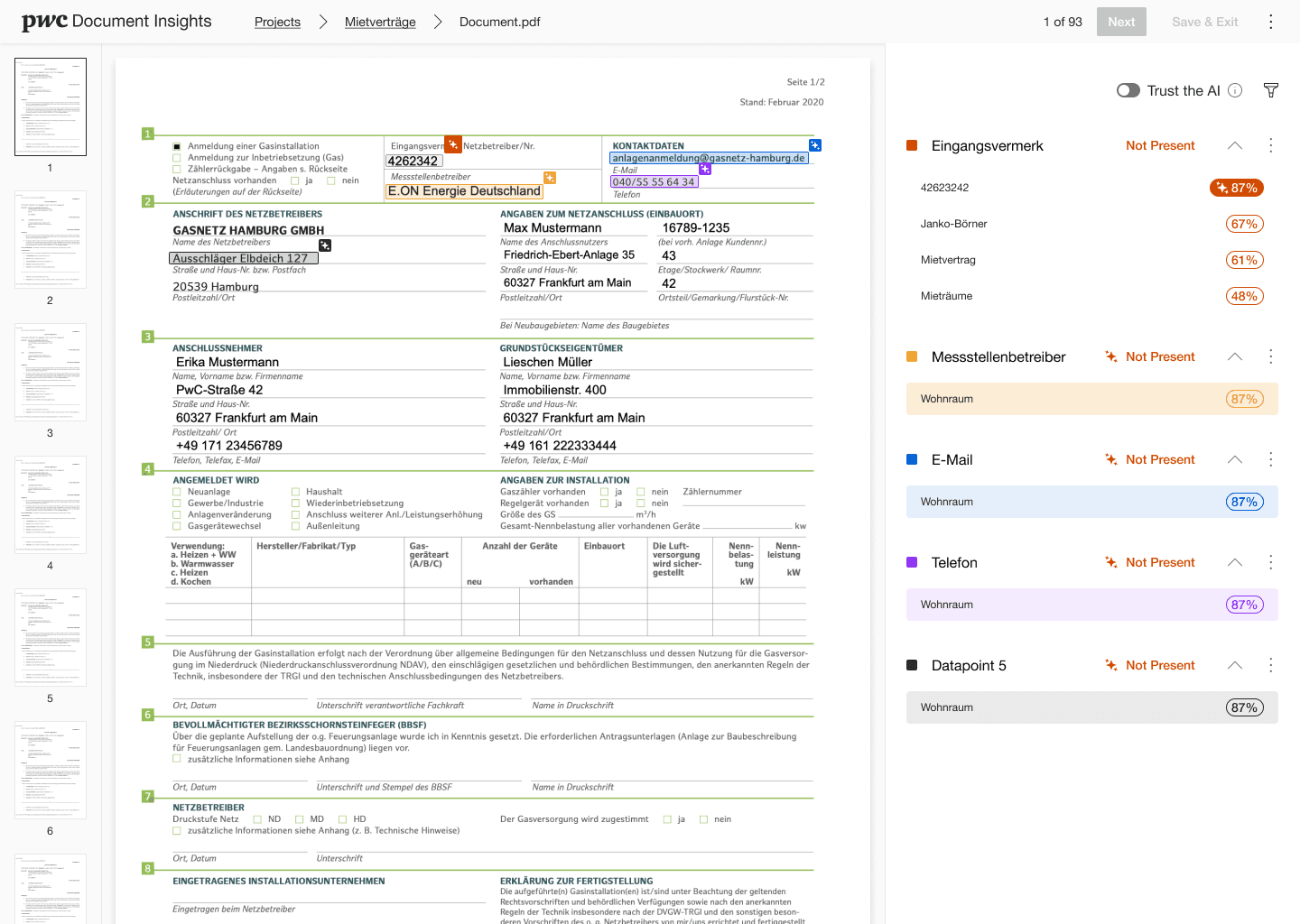
Instead of forcing users to search through long documents, selecting an extracted value immediately highlights its original location. The prediction and its supporting evidence stay visible at the same time, so instead of hunting for information, users simply verify it.
Try it: select any value to highlight the exact sentence it came from.
Make uncertainty visible.
A confidence percentage alone rarely helps a user decide where to focus. So the interface uses visual priority instead, guiding attention toward the predictions where human judgement adds the most value.
The model and the document agree. It clears without a human ever opening it.
Plausible, but not certain — surfaced for a quick human glance.
The model is unsure. This is exactly where human judgement adds the most value.
Rather than asking users to interpret a score, the interface says this one deserves your attention, and lets the confident ones clear quietly.
Make corrections part of the learning process.
Review isn’t the end of the workflow. It’s how the model improves. When a prediction is wrong, users update the value while the original evidence is preserved. The correction is immediately linked back to the document, creating high-quality feedback for future training without interrupting the flow.
Four principles guided every interaction.
Rather than asking people to trust AI, the product gives them the tools to verify it.
By reducing context switching, connecting every prediction to its source, and making uncertainty actionable, the review workflow becomes faster, easier to understand, and better suited for enterprise environments where accuracy matters. It shows how interaction design can make complex AI systems feel transparent, not by hiding uncertainty, but by giving people the information they need to make confident decisions.
Correcting AI should feel like reviewing a document, not debugging software.